
Creative Library
Transforming scattered creative assets into a reusable library for 5,000+ annual campaign launches.
Creative assets enter campaigns in two ways: partners upload them directly, or the Operations team handles setup on their behalf. Across 500+ partners and 5,000+ annual campaign launches, both groups need reliable access to the right asset at the right time.
As the sole product designer on this project, I led the work from discovery through validation. I validated the problem behind the initial concept, shaped the MVP scope with our Product Manager, and worked with Engineering on how a shared library should behave across the platform.
A few ad terms used here
- Creative
- a finished ad asset, such as an image, animation, or video.
- Partner
- a customer who pays for our platform and services, often managing campaigns for several advertisers.
- Line Item
- a single ad campaign, such as display or geofencing, ordered through a Proposal.
Problem
Scattered assets forced teams to repeat work before every campaign launch.
Approved creatives were scattered across email, in-platform messages, and shared drives. Past assets were visible only within individual campaigns, with no way to search across an advertiser's campaigns. With roughly 100 campaigns launching each week, Operations repeatedly requested the same files, searched old threads to confirm approved versions, and manually re-uploaded assets. Because a campaign could not go live until its assets arrived, every repeat request introduced another potential launch delay.
Goal
Make approved assets easy to find and reuse while reducing coordination across campaign workflows.
Success meant less back-and-forth before launch and more campaigns able to reuse approved assets. The business hypothesized that making missing formats and sizes visible could increase creative service orders by 10%.
Solution
One Creative Library, accessible from the workflows teams already use.
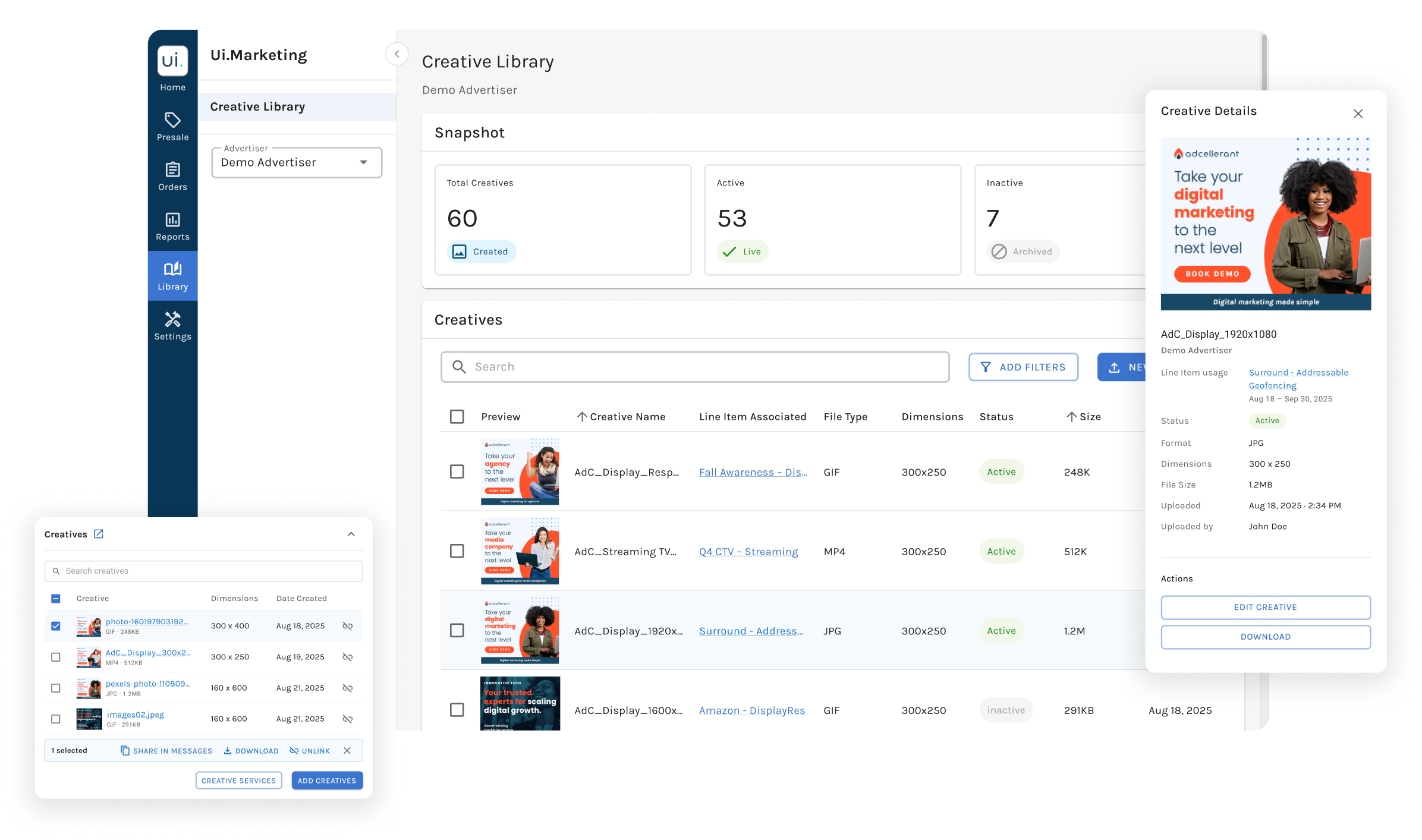
A central home for uploading, organizing, reviewing, and reusing assets, also reachable from Line Items and Proposals, so teams can find or add creatives without leaving the task at hand.
Validation
42 participants achieved a 98.4% completion rate across core tasks and surfaced two points of friction.
In an unmoderated Maze test with 23 Operations users and 19 partners, the high completion rate masked friction in two areas: a hard-to-find upload button, and an upload flow that felt like doing the work twice. I redesigned both before handoff.
98.4%
average task completion rate.
5.85 / 7
average SEQ score.
Discovery
Looking beyond storage.
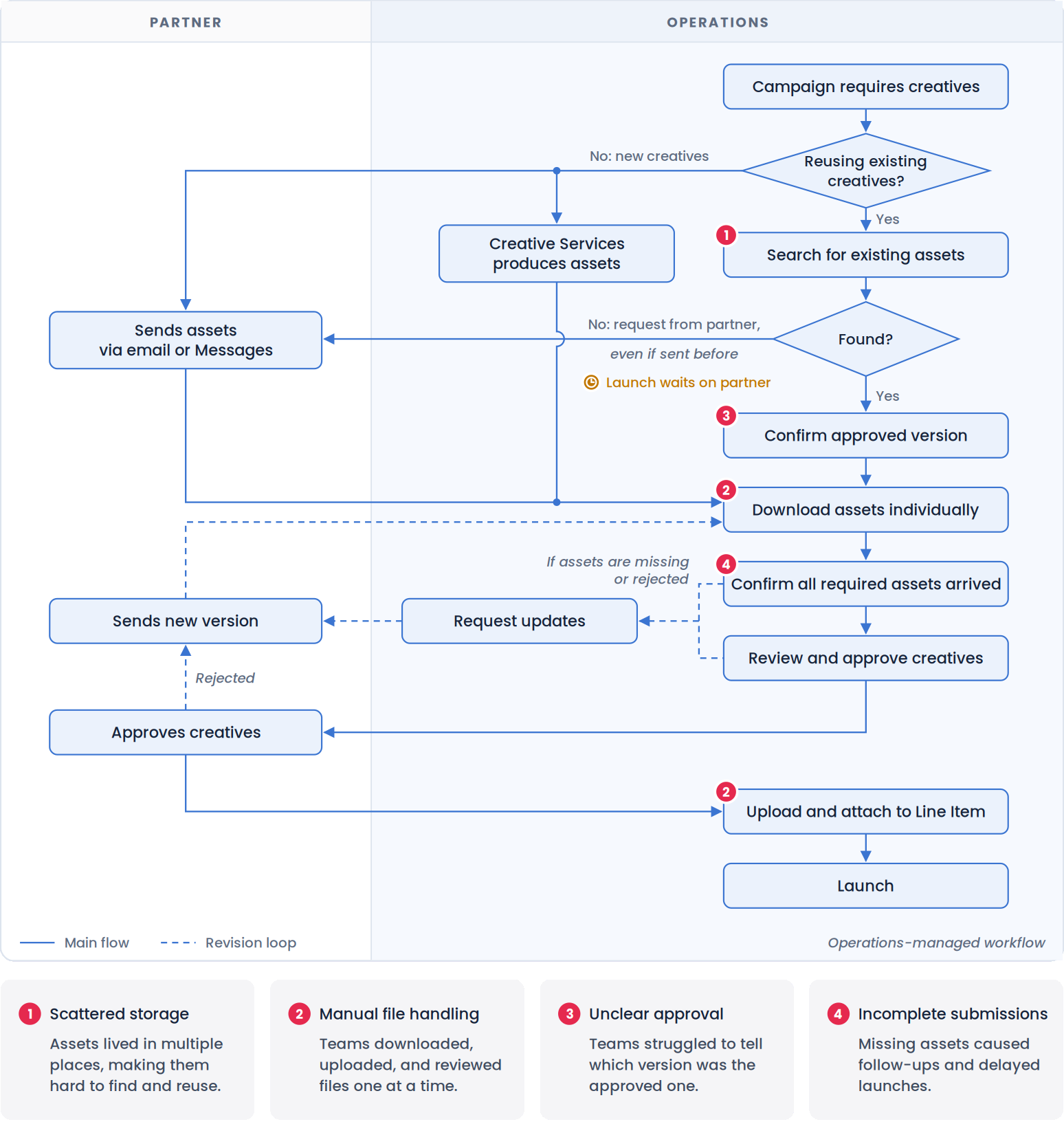
The PM proposed a Creative Library, and storage was clearly part of the problem. Before designing it, I mapped the current workflow end to end to identify which problems the library needed to solve.
📋 30+ feedback items
Over half about finding or re-requesting assets, including partner support tickets
👥 5 interviews
Operations team members
I interviewed Operations directly, while early partner input came through support tickets filed on their behalf. I revisited that research gap by including 19 partners in usability testing.
Four breakdowns: storage, file handling, approval, and submissions.
Strategy
Centralize the assets, not the workflow.
Defining the MVP scope
Not every need belonged in the MVP. With the PM, I prioritized by workflow impact, business value, scalability, and feasibility.
Included in the MVP
- Centralized Creative Library Solves scattered storage
- Bulk actions & preview Solves manual file handling
- Status, timestamps & ownership Solves unclear approval
- A path from the library to purchasing Connects visible gaps to the existing Proposal flow
Deferred
- Incomplete submissions Better solved in the submission workflow
- AI creative generation Costly to build, and generated creatives need a library to live in first
Structuring the library
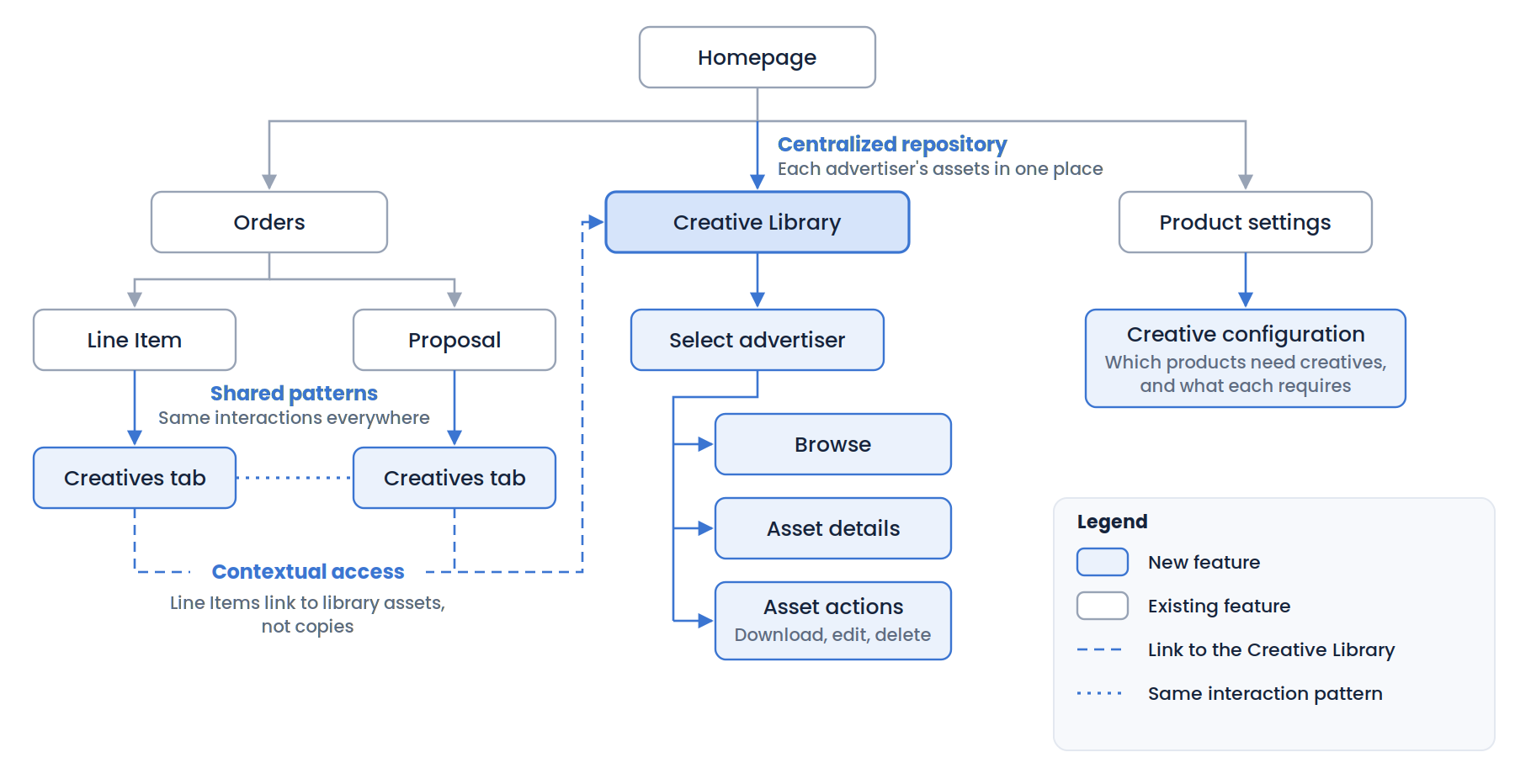
I mapped how one shared repository would connect to existing Line Item and Proposal workflows, and reviewed the model with Product and Engineering to confirm it fit the platform architecture.
Exploration
01: Designing around how people actually work.
ChallengeFinding: Teams had to remember which campaign or thread an asset was used in.Trusting: Even then, they couldn't easily tell whether it was the approved version.Managing: Files arrived in batches, but had to be handled one at a time.
Finding
How should creatives be organized and displayed?
I prototyped three ways to organize the library in Figma Make. Operations worked within one advertiser at a time, so I chose advertiser-first navigation, which also fits partners, who see only their own advertisers.
Option 1 — Group by advertiser
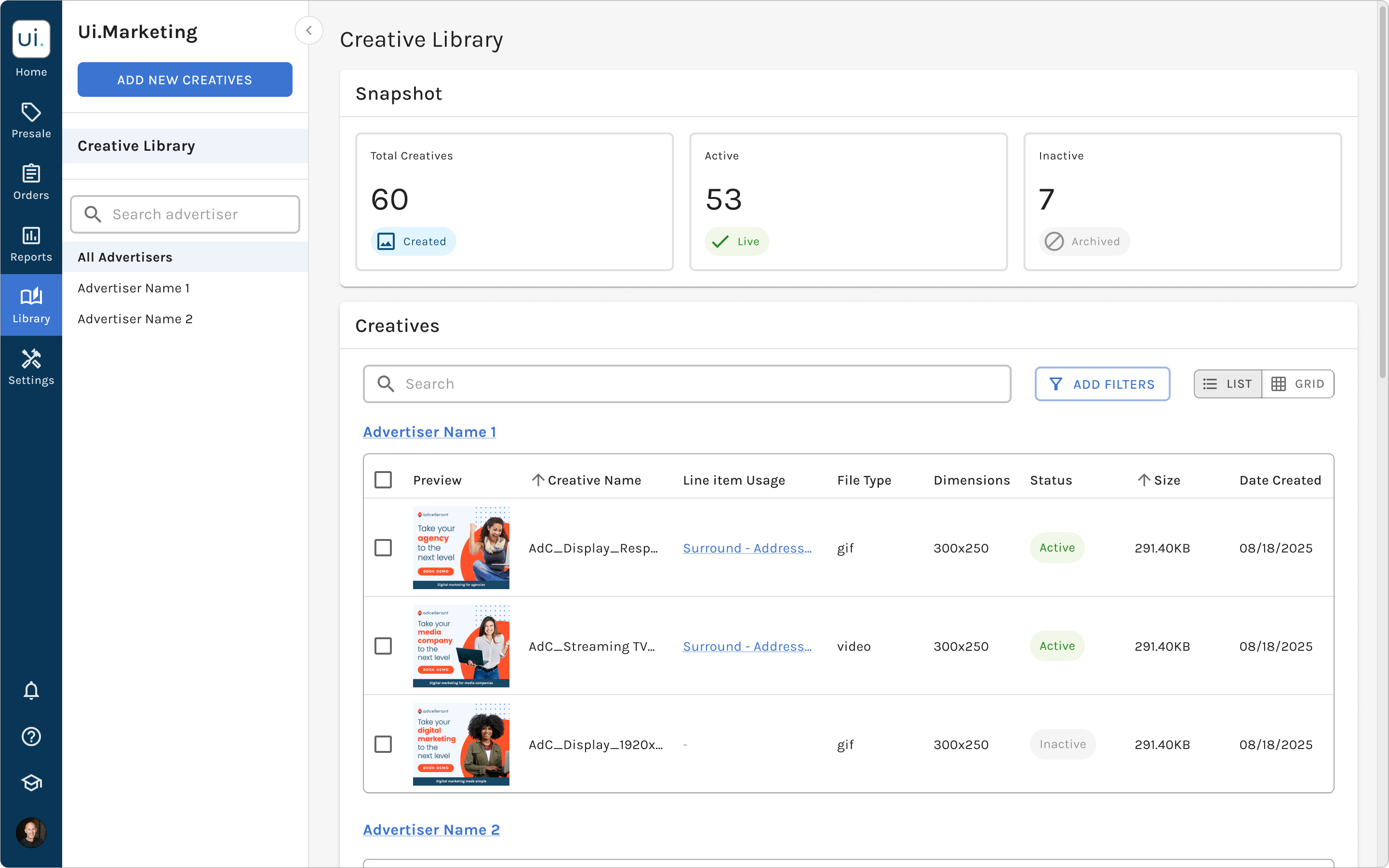
BenefitCreates clearer organization while keeping advertisers visible on one page.
TradeoffCan create a long, dense library as more advertisers are added.
Option 2 — Filter by advertiser
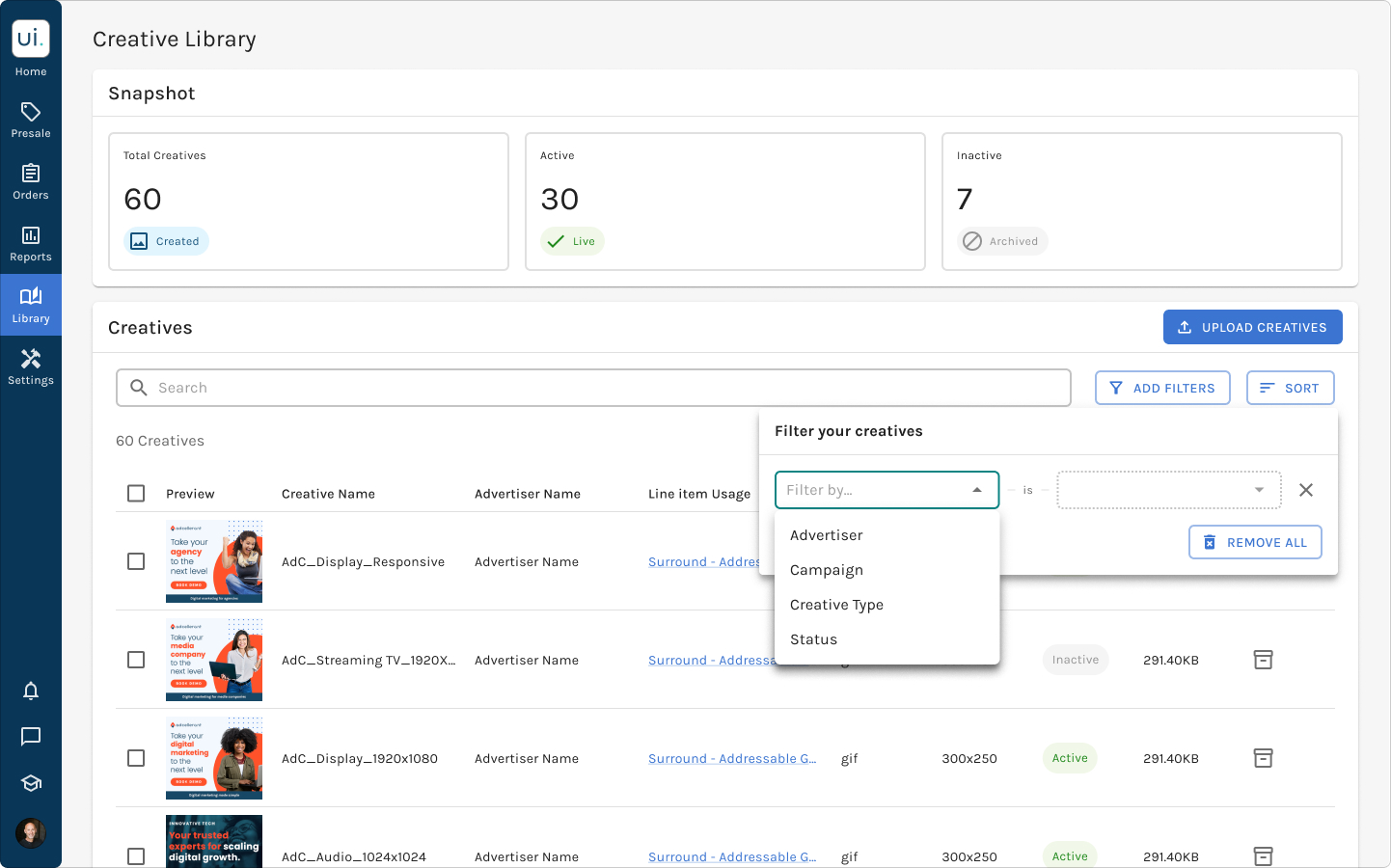
BenefitKeeps all creatives visible in one library and allows quick filtering.
TradeoffBecomes harder to navigate as the number of advertisers and assets grows.
Option 3 — Navigate by advertiser ✅
BenefitCreates a focused workspace for each advertiser and scales as the library grows.
TradeoffAdds one step before users can view creatives.
Within each advertiser, I chose a list view, since Operations identified creatives by name, size, status, and where they ran, rarely by thumbnail alone. A preview column keeps visual recognition, and a grid view was deferred because the list covered the core tasks.
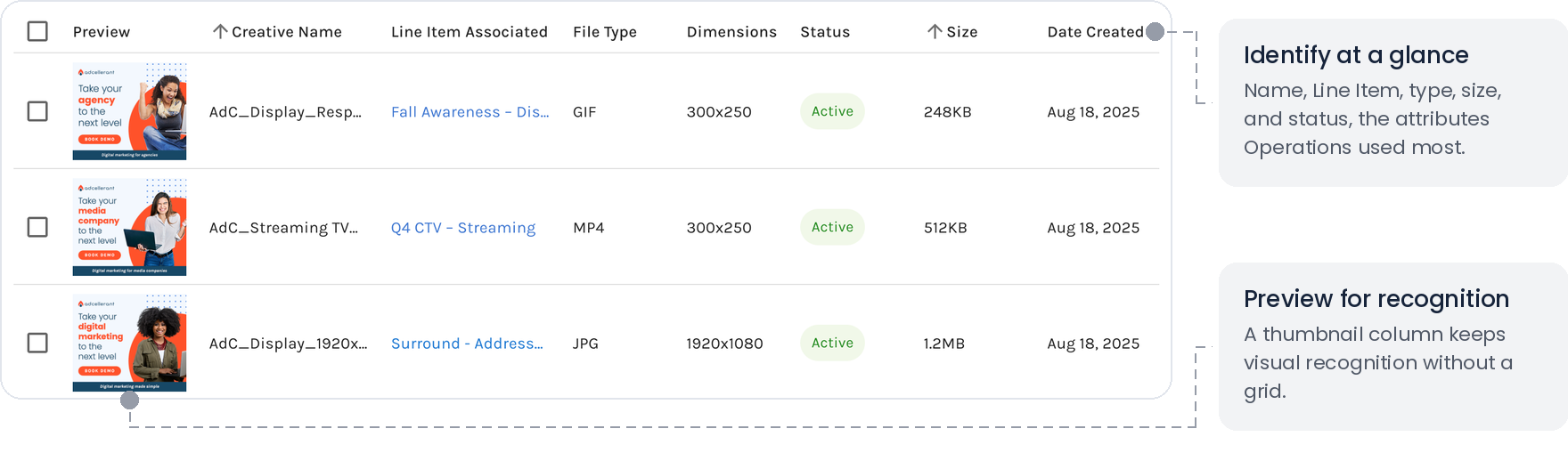
Trusting
Context for confident reuse
Before reusing an asset, teams need to know it's approved, current, and a fit for the new Line Item. The details panel answers all three in one place.
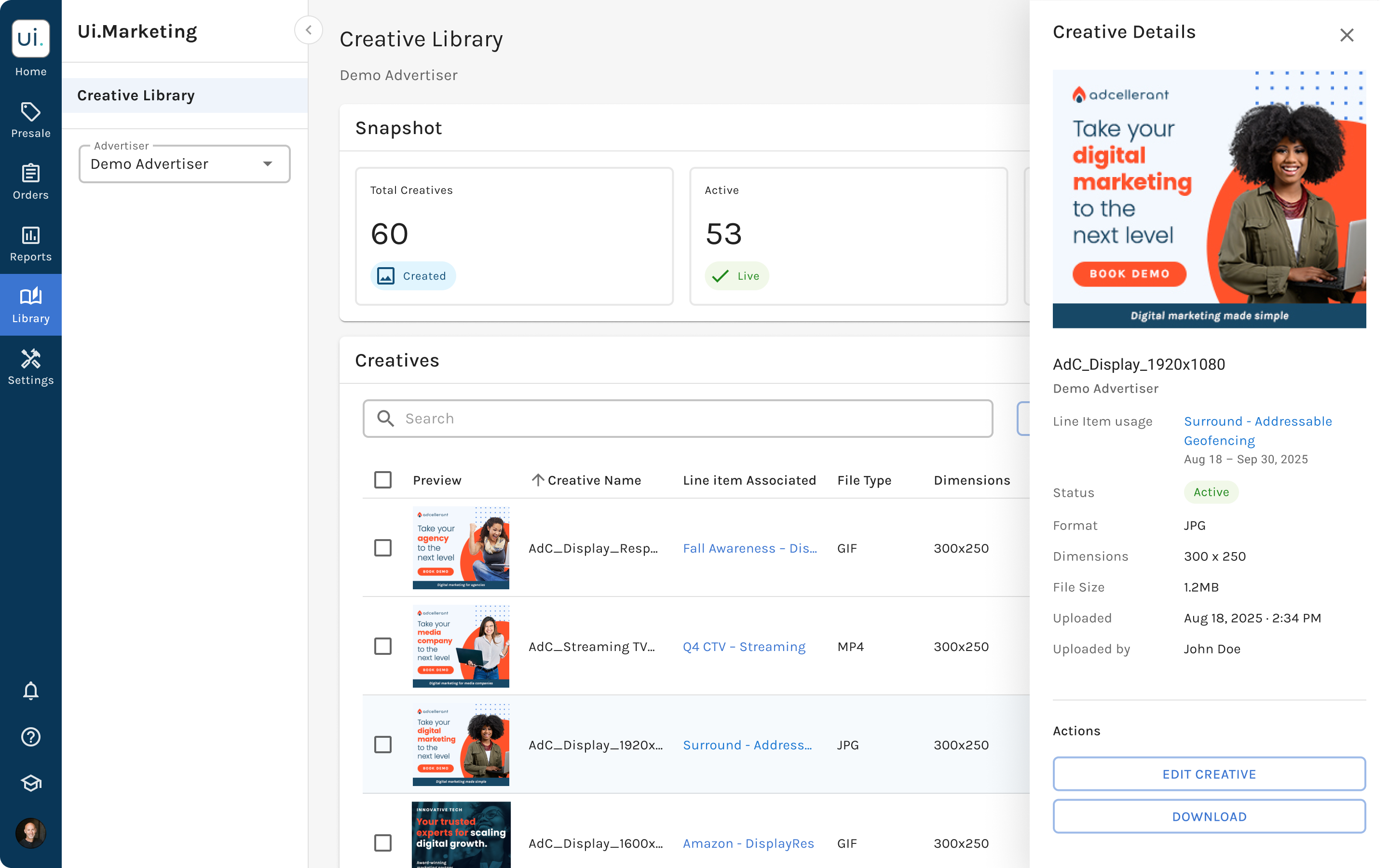
Check it's still current
Preview the asset without downloading it.
See where it's running
Review associated Line Items and run dates to see where and when the asset is being used.
Confirm it's approved and fits
Check its status, format, dimensions, upload date, and owner before reuse.
Managing
Upload and review assets as a set
Creatives arrive in batches, so upload handles a whole set at once, with a review step before anything joins the shared library. Bulk actions reuse the platform's existing pattern and appear once assets are selected.
-
Upload as a set
Add a whole set of files at once, not one at a time.
-
Review before adding
Preview each file and check its name and size, removing any uploaded by mistake before they're added to the library.
Business goal
Turning gaps into orders
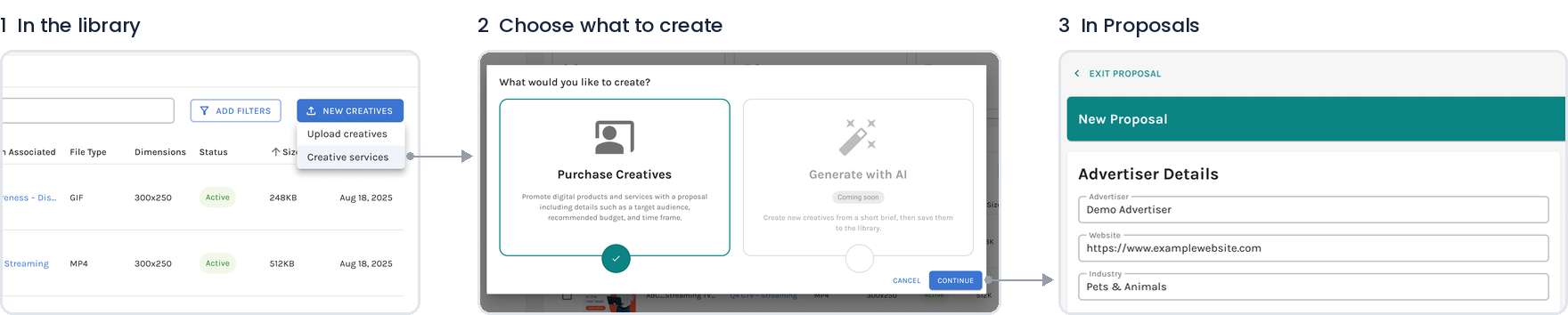
Seeing all of an advertiser's creatives in one place makes missing formats and sizes visible. To turn those gaps into orders, the New creatives menu links to the existing Proposal flow, with the advertiser's details prefilled.
AI generation is on the roadmap but was excluded from the MVP because of its development and operating costs, and because generated assets first needed a shared library.
02: Keeping teams in their workflow.
ChallengeTeams add creatives while building a Line Item, and leaving to find an asset breaks their flow.
Bringing the library into the Line Item
A separate page also risked becoming a library nobody visited.
Avoided
Designed
Inside a Line Item, the library opens in a window where teams can select existing creatives or upload new ones, in the same table they already know. The same pattern extends to Proposals.
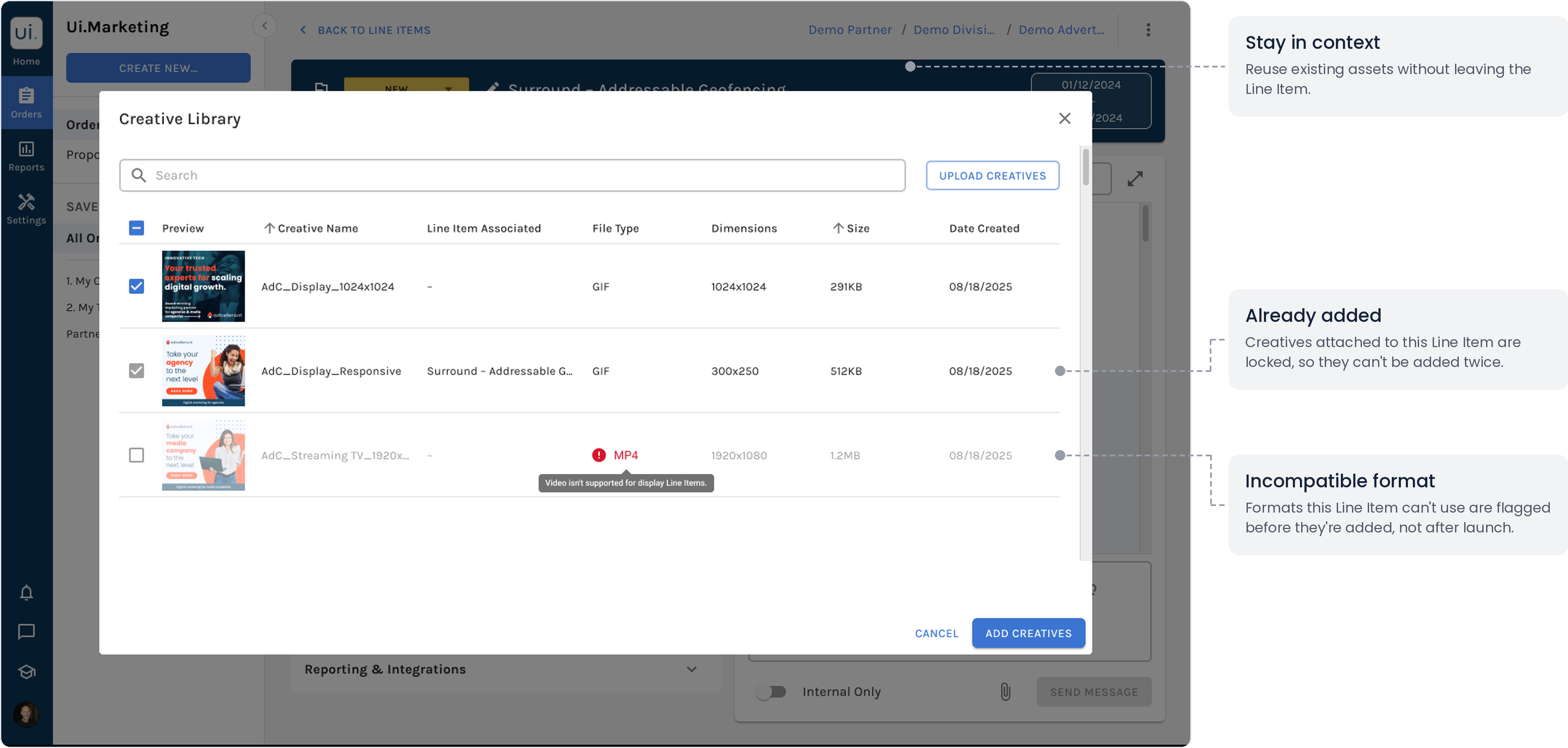
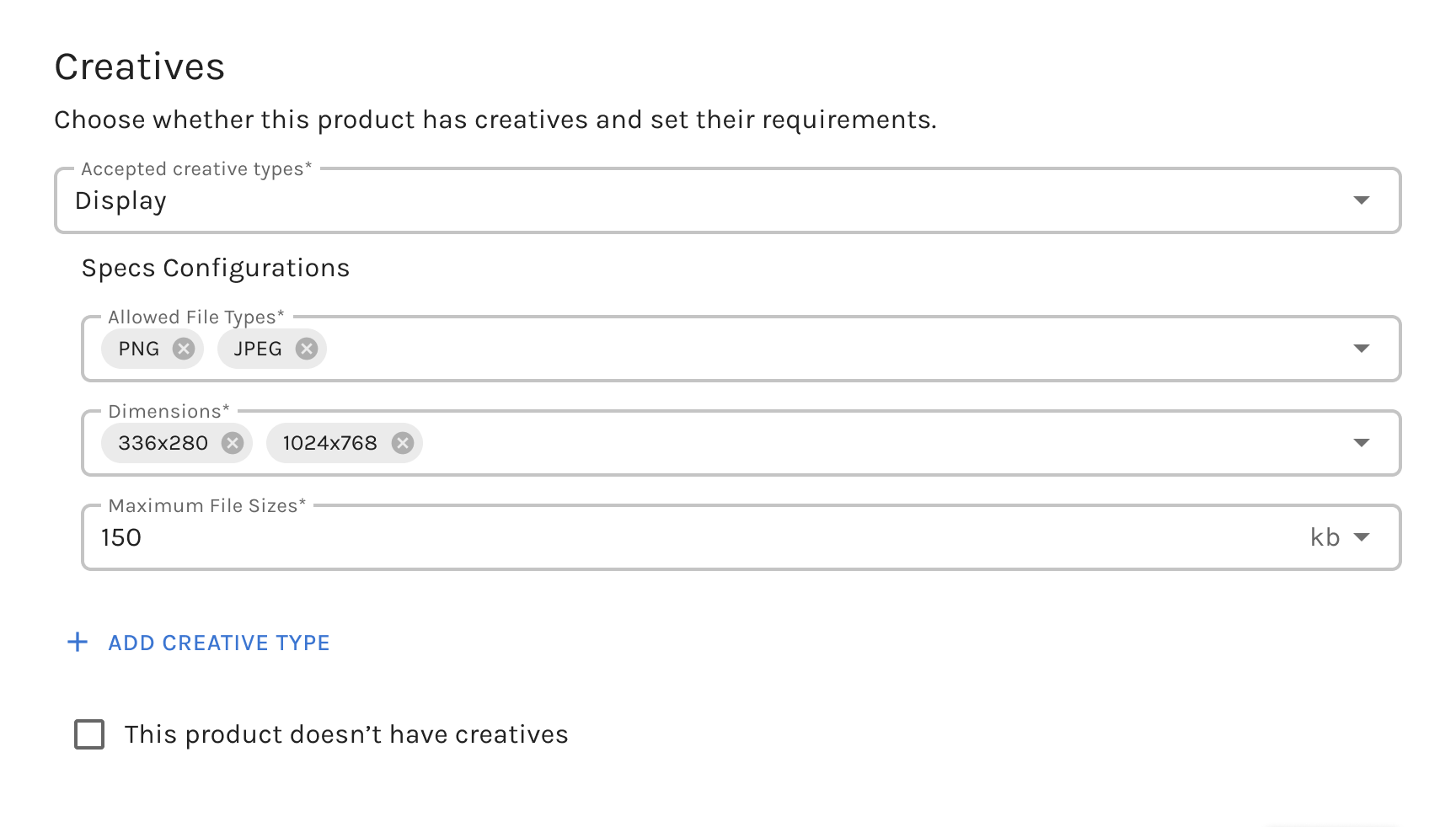
Format checks come from each product's settings, which define the creative types, file types, dimensions, and maximum size it accepts. The library window reads these rules, so files that don't fit are flagged before they're added.
Making shared assets safe
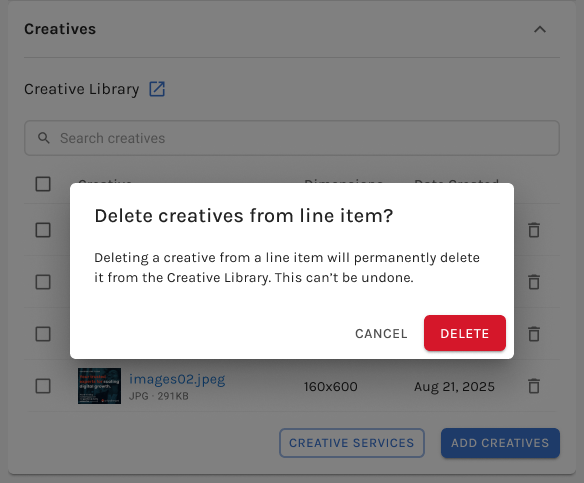
My first design let users delete a creative from a Line Item, behind a warning modal. In a design review session with the PM and engineers, we realized a warning wasn't enough: the library is shared, so deleting an asset from one campaign would also remove it from other teams' campaigns. We replaced the warning with two rules:
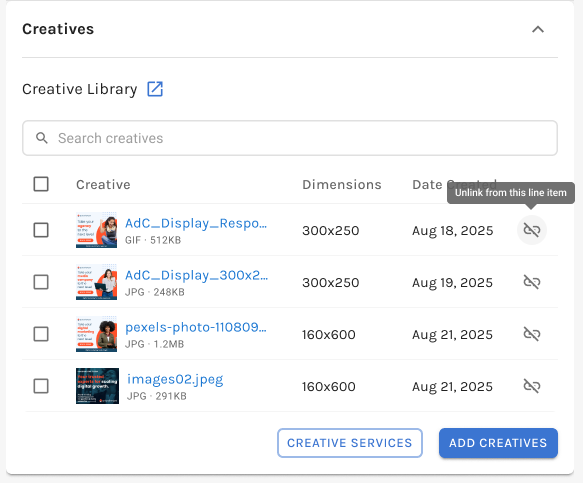
- Removing a creative from a Line Item only unlinks it.
First design ⛔️Delete from the Line Item, behind a warning
Final design ✅Unlink from this Line Item only
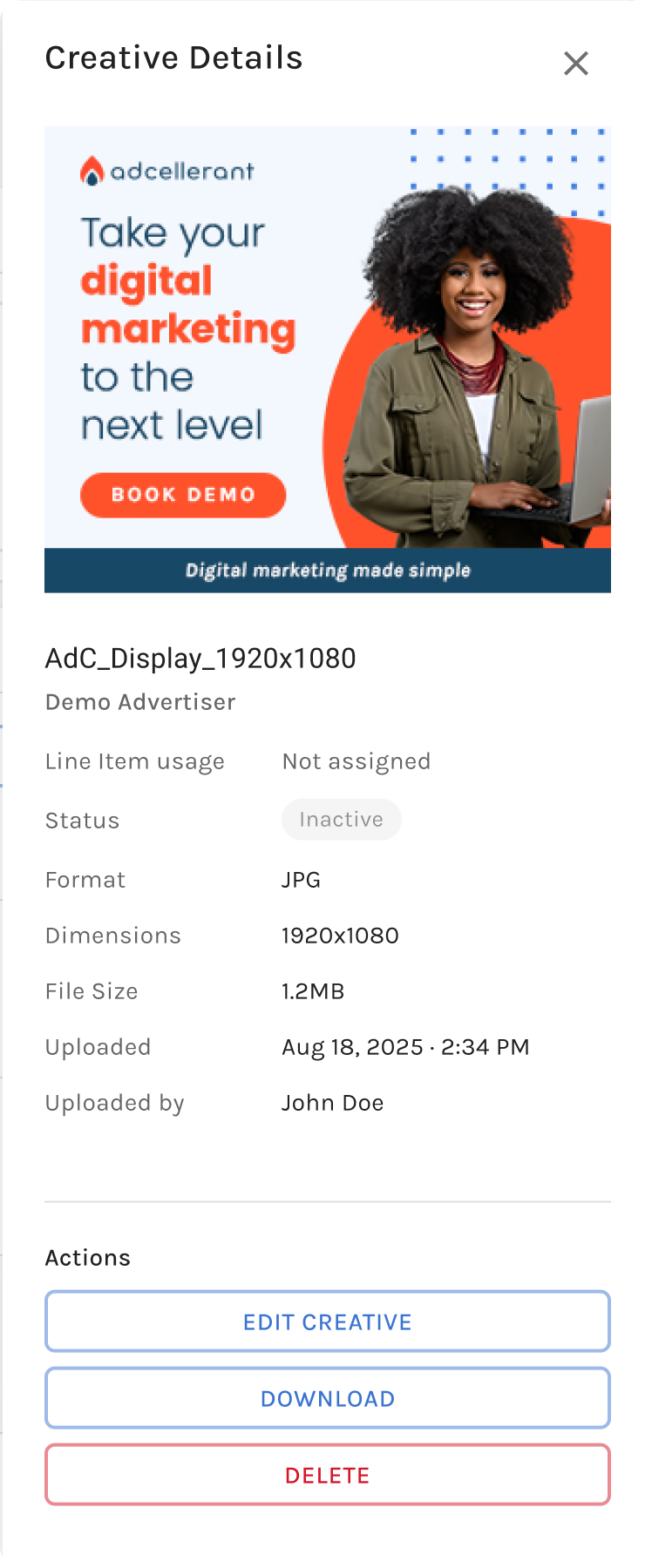
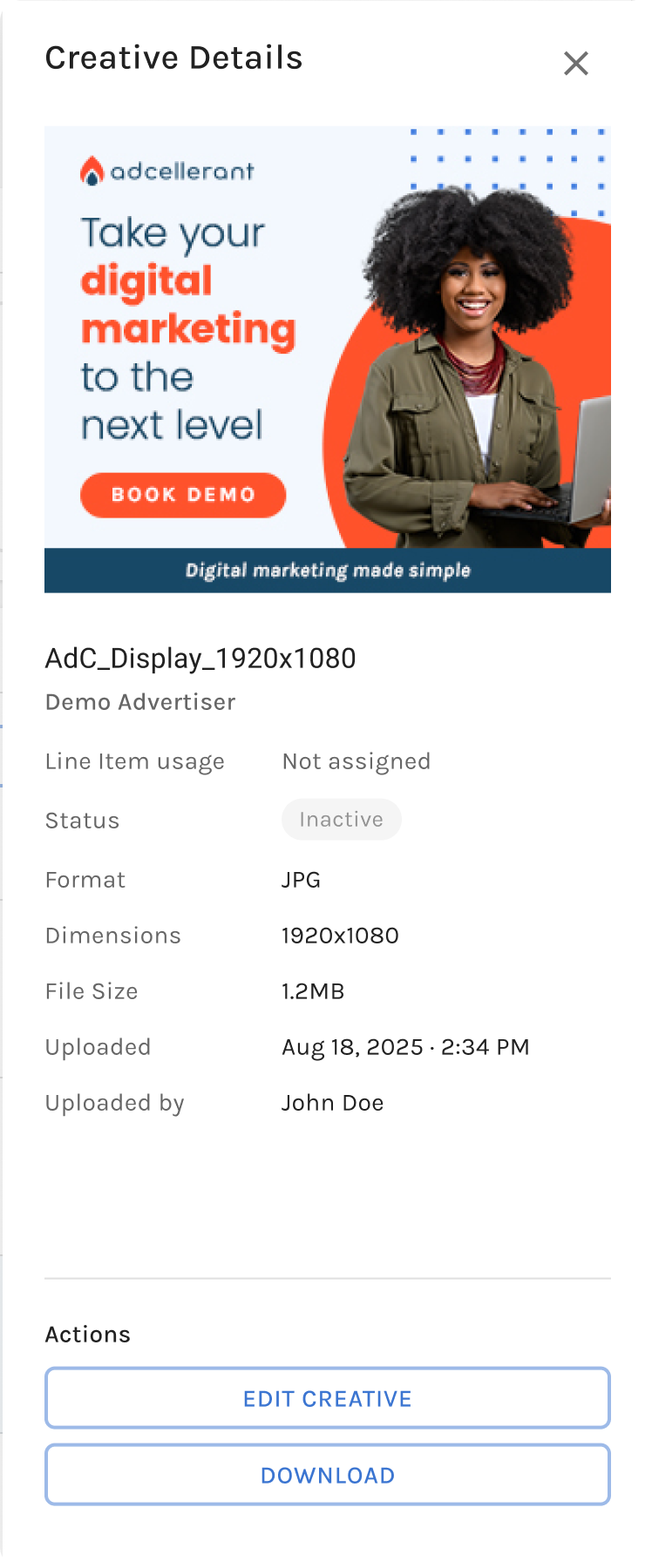
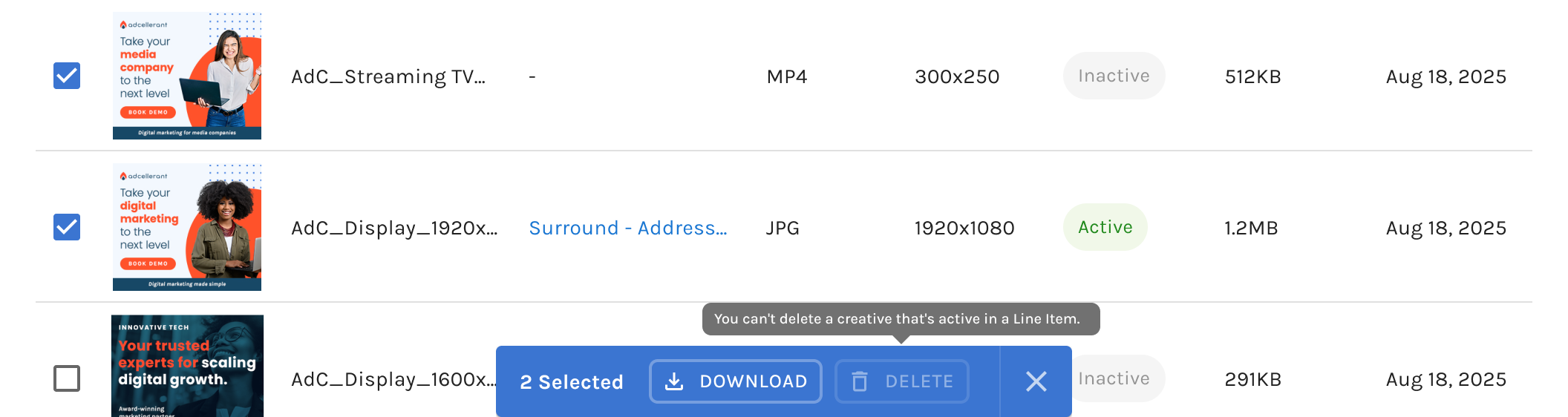
- Deleting is conditional: only Operations can delete, only from the library, and only when a creative isn't in use.
Only Operations can delete
OperationsEdit, download, and delete
PartnerEdit and download only
Nothing in use can be deleted
Testing
Easier to find, faster to finish.
I tested the full design with 42 participants in Maze, including 19 partners. Nearly everyone completed the core tasks, but their clicks and comments showed two places to improve.
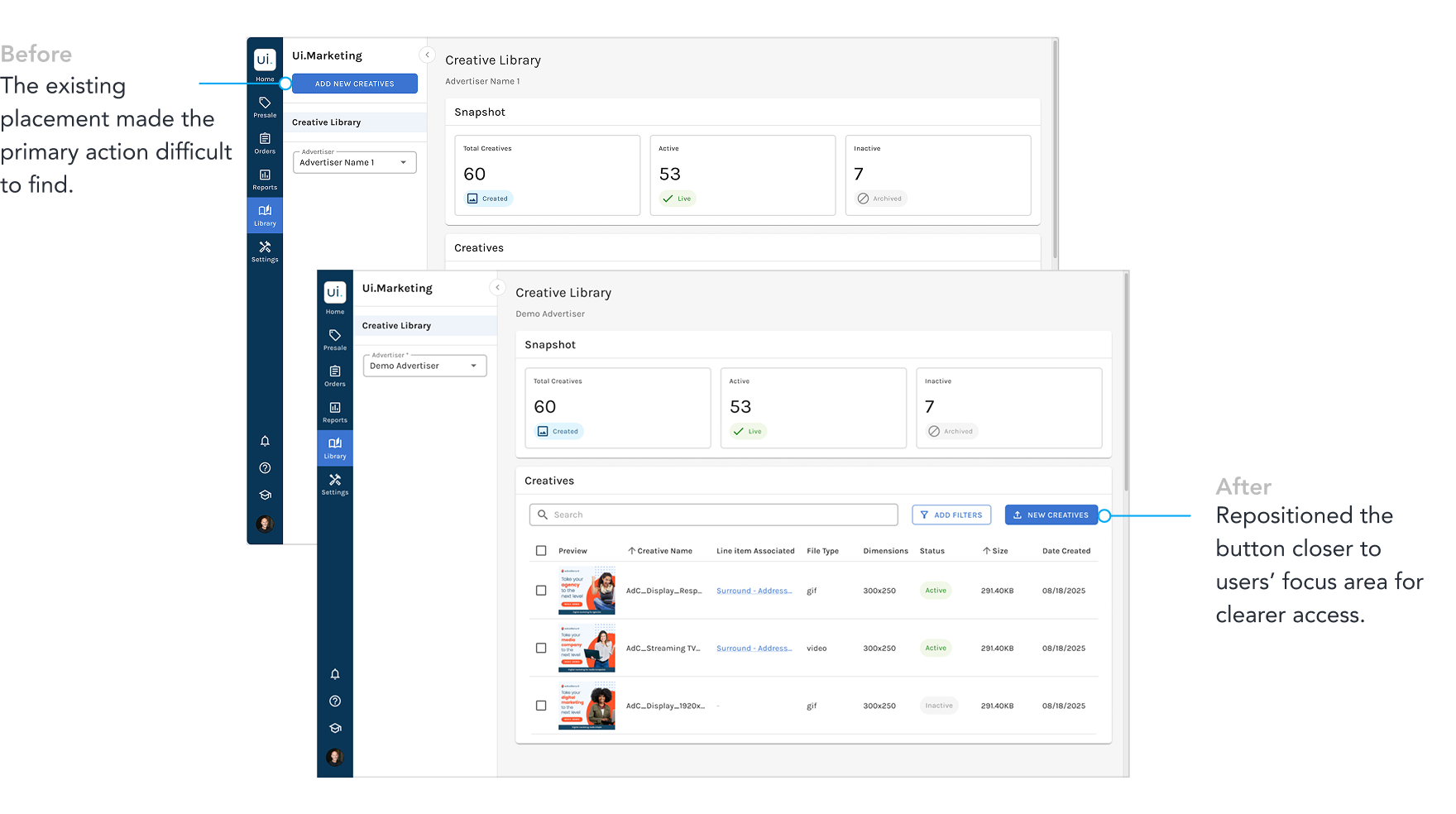
The upload button was hard to find
The upload button followed existing page conventions but sat in the sidebar, away from where participants expected to begin. During the upload task, 19 of 23 Operations participants and 4 of 19 partners clicked the table first. I moved New creatives above the table, prioritizing discoverability over consistency. The revised placement still needs validation.
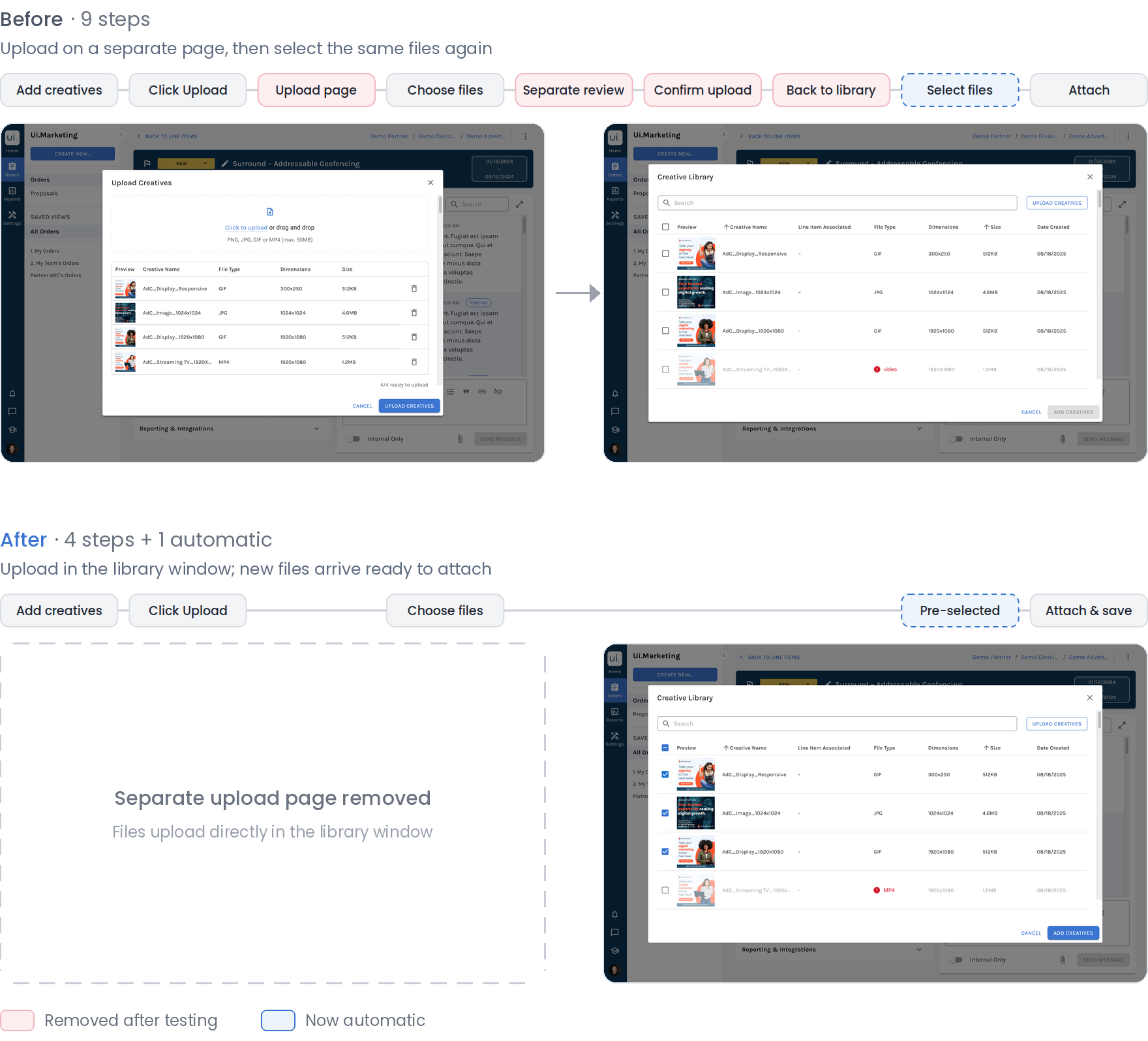
Uploading felt like doing it twice9 steps reduced to 4
The initial Line Item experience reused the library's upload flow, requiring users to upload files on a separate page and then select the same files again in the library window. Participants said it felt like uploading twice.
I moved upload into the library window itself. New files arrive pre-selected, and Add creatives attaches and saves them in one step. Files that users deselect are not saved to the library.
Final Design
One shared library supporting the end-to-end creative workflow.
The final design addresses three of the four breakdowns from Discovery: scattered storage, manual file handling, and unclear approval. Incomplete submissions were deferred to the submission workflow. It also opens a business opportunity: visible asset gaps lead directly into a creative-services order, with the advertiser's details prefilled.
Reflection
Not every pain point belongs in the same solution.
Research surfaced issues beyond asset management, including incomplete creative submissions. Rather than expanding the Creative Library to solve everything, we recognized that some problems were better addressed within the broader workflow. This helped keep the MVP focused while preserving opportunities for future improvements.
Consistency should support usability, not constrain it.
I initially followed established patterns, from the upload button's placement to reusing the library's upload flow within Line Items. Testing revealed where that consistency created friction instead of clarity. Together, these findings reinforced that established patterns should be a starting point, not a rule, when user behavior suggests otherwise.
Next Steps
Measuring whether the library changes behavior, not just whether people open it.
The library has not launched, so business impact data is not yet available. After launch, I would measure adoption, asset reuse across campaigns, time from asset receipt to campaign readiness, and creative-service orders initiated from the library. Together, these metrics would show whether the library reduces repeated requests and contributes to the projected 10% increase in order volume.